***Welcome to ashrafedu.blogspot.com * * * This website is maintained by ASHRAF***
Showing posts with label input-output. Show all posts

Sunday, July 4, 2021

Formatted Console I/O Operations

C++ supports a number of features that could be used for formatting the output. These features include:

·         ios class function and flags.

·         manipulators.

·         User-defined output functions.

I. The ios class contains a large number of member functions that would help us to format the output in a number of ways. Some of the functions are:

    1. Width()

    The width() function is used to define the width of a field necessary for the output of an item. As it is a         member function object is required to invoke it like

    cout.width(w);

    here w is the field width.

    The output will be printed in a field of w character wide at the right end of field.The width() function can     specify the field width for only one item(the item that follows immediately).After printing one item(as per     the specification) it will revert back the default.

    Example:

    cout.width(5);

    cout<<543<<12<<”\n”;

    will produce the following output:


    2. Precision()

    By default, the floating numbers are printed with six digits after the decimal points. This function can     be used to specify the number of digits to be displayed after the decimal point while printing the             floating point numbers.

    cout.precision(d);

    where d is the number of digits to the right of decimal point.

    Example:

    cout.precision(3);

    cout<<sqrt(2)<<”\n”;

    1.141 will be printed

    Unlike the function width(),precision() retains the setting in effect until it is reset.

    3. Fill()

    The unused portion of field width are filled with white spaces, by default. The fill() function can be         used to fill the unused positions by any desired character.It is used in the following form:

    cout.fill(ch);

    Where ch represents the character which is used for filling the unused positions.Example:

    cout.fill(‘*’);

    cout.width(10);

    cout<<5250<<”\n”;

    The output would be:

    Like precision (),fill() stays in effect until it is changed.

    4. Setf()

    The setf() a member function of the ios class, can provide answers left justified.The setf() function can be     used as follows:

    cout.setf(arg1.arg2)

    The arg1 is one of the formatting flags defined in the class ios.The formatting flag specifies the format         action required for the output.Another ios constant,arg2,known as bit field specifies the group to which         the formatting flag belongs.

    Example:

    cout.fill(‘*’);

    cout.setf(ios::left,ios::adjustfield);

    cout.width(15);

    cout<<”TABLE 1”<<”\n”;

    This will produce the following output:


    5. Unsetf()

    To clear the flags specified

II. Manipulators are special functions that can be included in the I/O statements to alter the format parameter of stream. To access these manipulators, the file iomanip should be included in the program.

Manipulators and their ios equivalents are:


In addition to these standard library manipulators we can create our own manipulator functions to provide any special output formats.

Designing our own manipulators:-

The general form for creating a manipulator without any argument is

ostream & manipulator (ostream & output)

{

……………

…………….(code)

……………..

return output;

}

Example:

#include <iostream.h>

#include <iomanip.h>

ostream &currency (ostream & output)

{

output<< “Rs”;

return output;

}

void main()

{

cout<<currency <<7864.5;

}

output:

Rs7864.5


Unformatted input/output Operations

Objects cin and cout are used for input and output of data by using the overloading of >> and << operators.

The >> operator is overloaded in the istream class and << is overloaded in the ostream class.

The following is the format for reading data from keyboard:

cin>>variable1>>variable2>>…………..>>variable n

This statement will cause the computer to stop the execution and look for the input data from the keyboard.

The general form of displaying data on the screen is

cout <<item1<<item2<<…………<<item n

put() and get() functions:-

The classes istream and ostream define two member functions get(),put() respectively to handle the single character input/output operations.

There are two types of get() functions: get(char *) and get(void), used to fetch a character including the blank space, tab and newline character.

The get(char *) version assigns the input character to its argument and the get(void) version returns the input character.

Since these functions are members of input/output Stream classes, these must be invoked using appropriate objects.

Example:

char c; 

cin.get( c ) //get a character from the keyboard and assigns it to c

while( c!=’\n’)

{

cout<< c; //display the character on screen

cin.get( c ) //get another character

}


The get(void) version is used as follows:

…………..

char c;

c= cin.get();

…………

The value returned by the function get() is assigned to the variable c.

The function put(), a member of ostream class can be used to output a line of text, character by character.

For example

cout.put(‘x’);

displays the character x and

cout.put(ch);

displays the value of variable ch.

The variable ch must contain a character value.A number can be used as an argument to function put().

For example,

cout.put(65);

displays the character A.This statement will convert the numeric value 65 to a char value and displays character whose ASCII value is 65.

Example: Character I/O with get() and put()

#include <iostream>

void main()

{

char c;

cout<<”INPUT TEXT \n”;

cin.get( c );

while ( c 1=’\n’ )

{

cout.put( c);

cin.get( c );

}

}

getline() and write() functions:-

A line of text can be read or display effectively using the line oriented input/output functions getline() and write().

The getline() function reads a whole line of text that ends with a newline character. This function can be invokedby using the object cin as follows:

cin.getline(line,size);

The reading is terminated as soon as either the newline character ‘\n’ is encountered or size-1 characters are read(whichever occurs first).The newline character is read but not saved, instead it is replaced by the null character

Example: Reading Strings With getline()

#include <iostream>

int main()

{

int size=20;

char city[20];

cout<<”enter city name:\n “;

cin>>city;

cout<<”city name:”<<city<<”\n\n”;

cout<<”enter city name again: \n”;

cin.getline(city,size);

cout<<”city name now:”<<city<<”\n\n”;

}

The write() function displays an entire line and has the following form:

cout.write(line,size)

The first argument line represents the name of the string to be displayed and the second argument size indicates the number of characters automatically when the null character is encountered.If the size is greater than the length of line, then it displays beyond the bound of line.

Displaying String With write()

#include <iostream.h>

#include<string.h>

int main(0

{

char * string1 =”Programming”;

int n=strlen(string1);

cout.write(string2,n);

//crossing the boundary

cout.write(string1,20);

return 0;

}


C++ streams

A stream is a logical device that either produces or consumes information. A stream is linked to a physical device by the I/O system.

A stream acts like a source or destination. The source stream that provides data to the program is called the input stream and the destination stream that receive output from the program is called the output stream.

C++ contains cin and cout predefined streams that opens automatically when a program begins its execution.cin represents the input stream connected to the standard input device and cout represents the output stream connected to standard output device.

C++ Stream Classes:

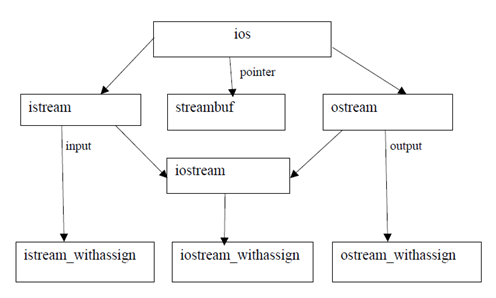
The C++ I/O system contains a hierarchy of classes that are used to define various streams to deal with both the console and disk files. These classes are called stream classes. These classes are declared in the header file iostream. The file should be included in all programs that communicate with the console unit.


As shown in figure ios is the base class for istream(input stream) and ostream(output stream) which are base classes for iostream(input/output stream).

The class ios is declared as the virtual base class so that only one copy of its members are inherited by the iostream.

The class ios provides the basic support for formatted and unformatted input/output operations.The class istream provides the facilities for formatted and unformatted input while the class ostream(through inheritance) provides the facilities for formatted output.

The class iostream provides the facilities for handling both input output streams. Three classes namely istream_withassign, ostream_withassign and iostream_withassign add assignment operators to these classes.